Spectral Features#
import IPython.display as ipd
import matplotlib.pyplot as plt
import librosa.display
import sklearn

from mirdotcom import mirdotcom

mirdotcom.init()
For classification, we’re going to be using new features in our arsenal: spectral moments (centroid, bandwidth, skewness, kurtosis) and other spectral statistics.
A moment is a term used in physics and statistics. There are raw moments and central moments.
You are probably already familiar with two examples of moments: mean and variance. The first raw moment is known as the mean. The second central moment is known as the variance.
Spectral Centroid#
Load an audio file:
filename = mirdotcom.get_audio("simple_loop.wav")
x, sr = librosa.load(filename)
ipd.Audio(x, rate=sr)
The spectral centroid (Wikipedia) indicates at which frequency the energy of a spectrum is centered upon. This is like a weighted mean:
where \(S(k)\) is the spectral magnitude at frequency bin \(k\), \(f(k)\) is the frequency at bin \(k\).
librosa.feature.spectral_centroid computes the spectral centroid for each frame in a signal:
spectral_centroids = librosa.feature.spectral_centroid(y=x, sr=sr)[0]
spectral_centroids.shape
(97,)
Compute the time variable for visualization:
frames = range(len(spectral_centroids))
t = librosa.frames_to_time(frames)
Define a helper function to normalize the spectral centroid for visualization:
def normalize(x, axis=0):
    return sklearn.preprocessing.minmax_scale(x, axis=axis)
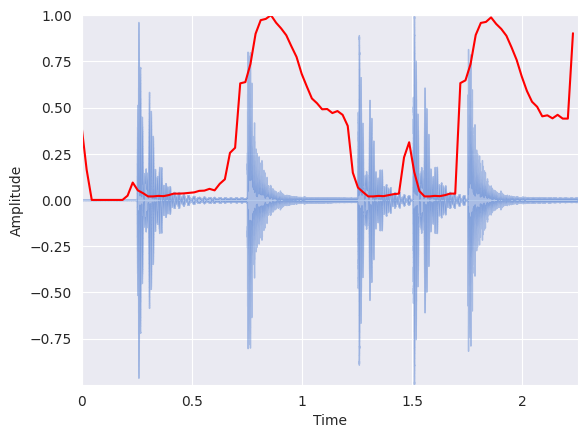
Plot the spectral centroid along with the waveform:
librosa.display.waveshow(x, sr=sr, alpha=0.4)
plt.plot(
    t, normalize(spectral_centroids), color="r"
)  # normalize for visualization purposes
plt.ylabel("Amplitude")
Text(22.472222222222214, 0.5, 'Amplitude')
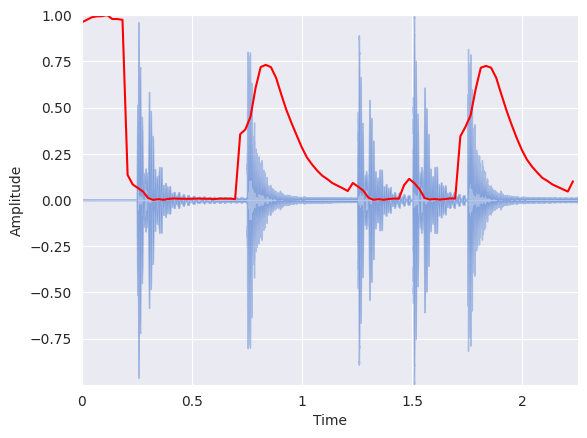
Similar to the zero crossing rate, there is a spurious rise in spectral centroid at the beginning of the signal. That is because the silence at the beginning has such small amplitude that high frequency components have a chance to dominate. One hack around this is to add a small constant before computing the spectral centroid, thus shifting the centroid toward zero at quiet portions:
spectral_centroids = librosa.feature.spectral_centroid(y=x + 0.01, sr=sr)[0]
librosa.display.waveshow(x, sr=sr, alpha=0.4)
plt.plot(
    t, normalize(spectral_centroids), color="r"
)  # normalize for visualization purposes
plt.ylabel("Amplitude")
Text(22.472222222222214, 0.5, 'Amplitude')
Spectral Bandwidth#
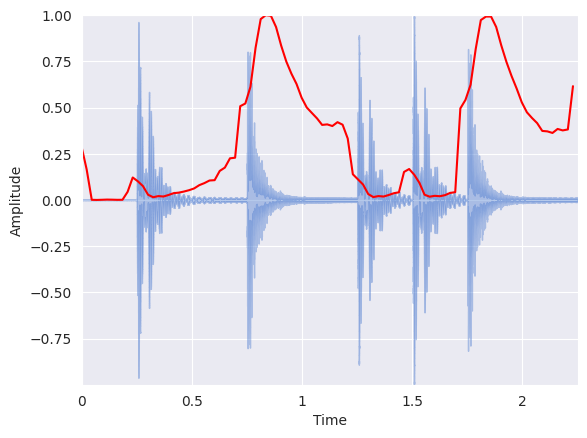
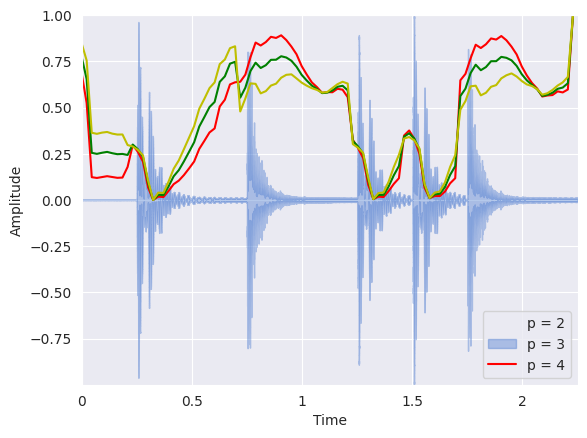
librosa.feature.spectral_bandwidth computes the order-\(p\) spectral bandwidth:
where \(S(k)\) is the spectral magnitude at frequency bin \(k\), \(f(k)\) is the frequency at bin \(k\), and \(f_c\) is the spectral centroid. When \(p = 2\), this is like a weighted standard deviation.
spectral_bandwidth_2 = librosa.feature.spectral_bandwidth(y=x + 0.01, sr=sr)[0]
spectral_bandwidth_3 = librosa.feature.spectral_bandwidth(y=x + 0.01, sr=sr, p=3)[0]
spectral_bandwidth_4 = librosa.feature.spectral_bandwidth(y=x + 0.01, sr=sr, p=4)[0]
librosa.display.waveshow(x, sr=sr, alpha=0.4)
plt.plot(t, normalize(spectral_bandwidth_2), color="r")
plt.plot(t, normalize(spectral_bandwidth_3), color="g")
plt.plot(t, normalize(spectral_bandwidth_4), color="y")
plt.legend(("p = 2", "p = 3", "p = 4"))
plt.ylabel("Amplitude")
Text(22.472222222222214, 0.5, 'Amplitude')
Spectral Contrast#
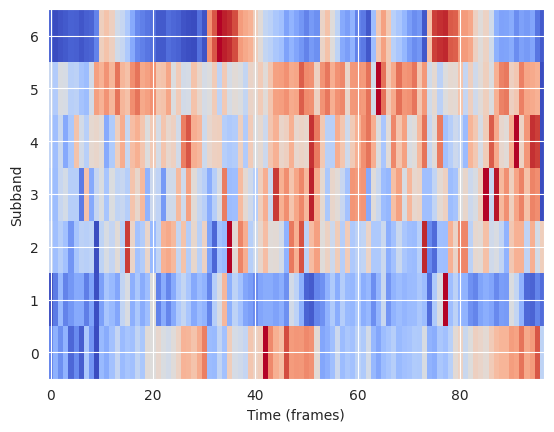
Spectral contrast considers the spectral peak, the spectral valley, and their difference in each frequency subband. For more information:
librosa.feature.spectral_contrast computes the spectral contrast for six subbands for each time frame:
spectral_contrast = librosa.feature.spectral_contrast(y=x, sr=sr)
spectral_contrast.shape
(7, 97)
Display:
plt.imshow(
    normalize(spectral_contrast, axis=1), aspect="auto", origin="lower", cmap="coolwarm"
)
plt.ylabel("Subband")
plt.xlabel("Time (frames)")
Text(0.5, 0, 'Time (frames)')
Spectral Rolloff#
Spectral rolloff is the frequency below which a specified percentage of the total spectral energy, e.g. 85%, lies.
librosa.feature.spectral_rolloff computes the rolloff frequency for each frame in a signal:
spectral_rolloff = librosa.feature.spectral_rolloff(y=x + 0.01, sr=sr)[0]
librosa.display.waveshow(x, sr=sr, alpha=0.4)
plt.plot(t, normalize(spectral_rolloff), color="r")
plt.ylabel("Amplitude")
Text(22.472222222222214, 0.5, 'Amplitude')