Principal Component Analysis#
import IPython.display
import matplotlib.pyplot as plt
import librosa
import sklearn

from mirdotcom import mirdotcom

mirdotcom.init()
Load a file:
filename = mirdotcom.get_audio("125_bounce.wav")
x, fs = librosa.load(filename)
Listen to the signal:
IPython.display.Audio(x, rate=fs)
Compute some features:
X = librosa.feature.mfcc(y=x, sr=fs)
print(X.shape)
(20, 331)
Scale the features to have zero mean and unit variance:
X = sklearn.preprocessing.scale(X)
/home/huw-cheston/Documents/python_projects/musicinformationretrieval.com/venv/lib/python3.10/site-packages/sklearn/preprocessing/_data.py:265: UserWarning: Numerical issues were encountered when centering the data and might not be solved. Dataset may contain too large values. You may need to prescale your features.
  warnings.warn(
/home/huw-cheston/Documents/python_projects/musicinformationretrieval.com/venv/lib/python3.10/site-packages/sklearn/preprocessing/_data.py:284: UserWarning: Numerical issues were encountered when scaling the data and might not be solved. The standard deviation of the data is probably very close to 0.
  warnings.warn(
X.mean()
-9.2198125e-09
Create a PCA model object.
model = sklearn.decomposition.PCA(n_components=2, whiten=True)
Apply PCA to the scaled features:
model.fit(X.T)
PCA(n_components=2, whiten=True)In a Jupyter environment, please rerun this cell to show the HTML representation or trust the notebook.
On GitHub, the HTML representation is unable to render, please try loading this page with nbviewer.org.
Parameters
| n_components | 2 | |
| copy | True | |
| whiten | True | |
| svd_solver | 'auto' | |
| tol | 0.0 | |
| iterated_power | 'auto' | |
| n_oversamples | 10 | |
| power_iteration_normalizer | 'auto' | |
| random_state | None |
Y = model.transform(X.T)
print(Y.shape)
(331, 2)
Let’s see how many principal components were returned:
model.components_.shape
(2, 20)
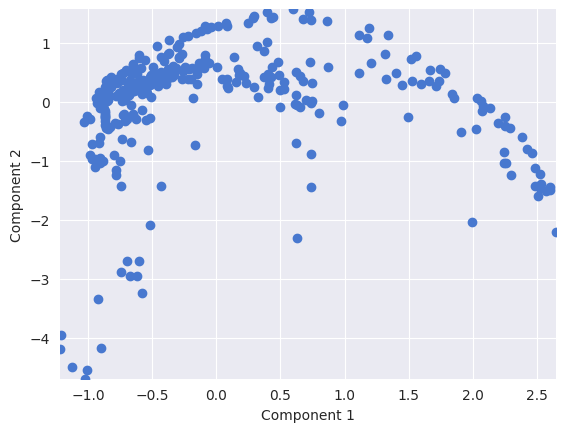
Plot the two top principal components for each data point:
plt.scatter(Y[:, 0], Y[:, 1])
plt.xlabel("Component 1")
plt.ylabel("Component 2")
Text(0, 0.5, 'Component 2')